

New in Drew: AutoBalloon, smarter AutoFit, new installer

Drew is our drawing automation add-in for SOLIDWORKS. It does the boring 80% of the work for you so you can focus on the critical 20%. We just released version 4.3.
1. Fixed dimensions floating away from views
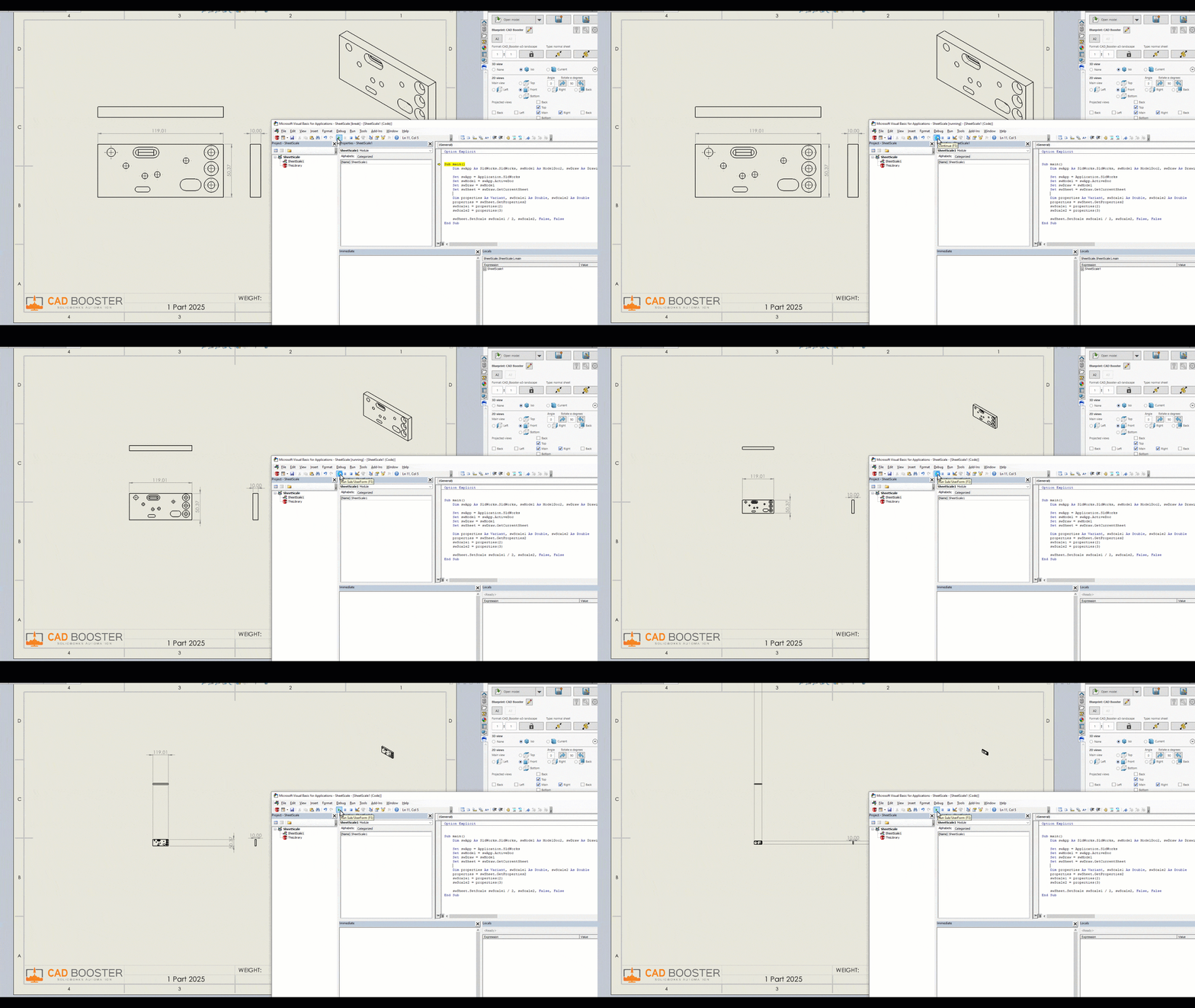
There is a strange SOLIDWORKS bug that we have been working around for years. When you change the sheet scale, dimensions start floating away from your drawing views. After five scale changes, the dimensions are meters away from your views. Not great.
Drew contained a workaround for years that shifted dimensions back after each scale change. But we have now dug deeper, we found the APIs that caused this issue and reported them to SOLIDWORKS. Those APIs are now being fixed. In the meantime, we have started using different sheet scale APIs and removed the old dimension-shifting code. This will make things a little slower since every scale change requires a Force Rebuild, but it works!
The bug in action:
2. AutoBalloon
The built-in AutoBalloon feature in SOLIDWORKS gets quite some hate, so we were never keen on adding it to Drew. But we got so many requests, I assume from the quiet majority, that we ended up adding AutoBalloon to Drew anyway.
To enable AutoBalloon, go into your Blueprint settings, into the new Balloons tab and enable either the setting for assemblies or the setting for parts. You also get to set a limit on the component/body count so we don’t start adding 100+ balloons to your drawings.
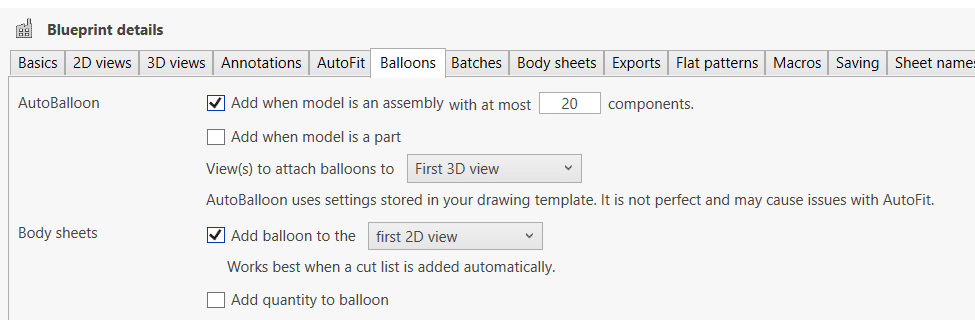
We added a warning about fitting issues when AutoBalloon is enabled. Those issues are probably related to the sheet scale situation mentioned above. We’ll keep an eye out for changes and we’ll remove the warning when it no longer occurs.
3. AutoFit modes
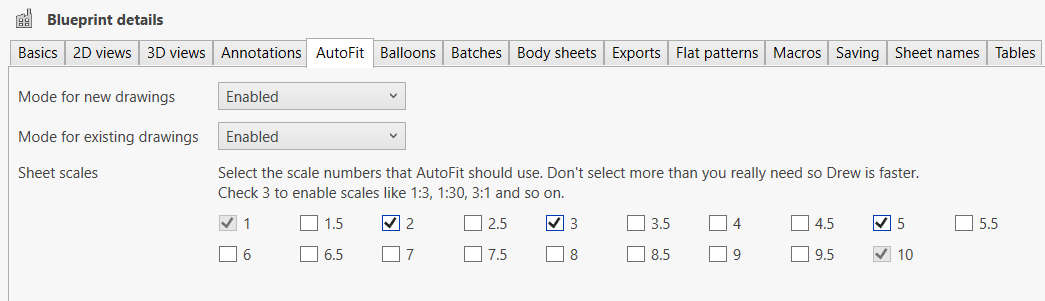
Another request from our users. They like our smart AutoFit feature, but not for every drawing. So we now let you choose an AutoFit mode for new and existing drawings. You have three options:
- Enabled
- Tight Fit
- Disabled
We added an AutoFit tab to the settings, and we also moved the sheet scale checkboxes to this tab:
4. A modern installer
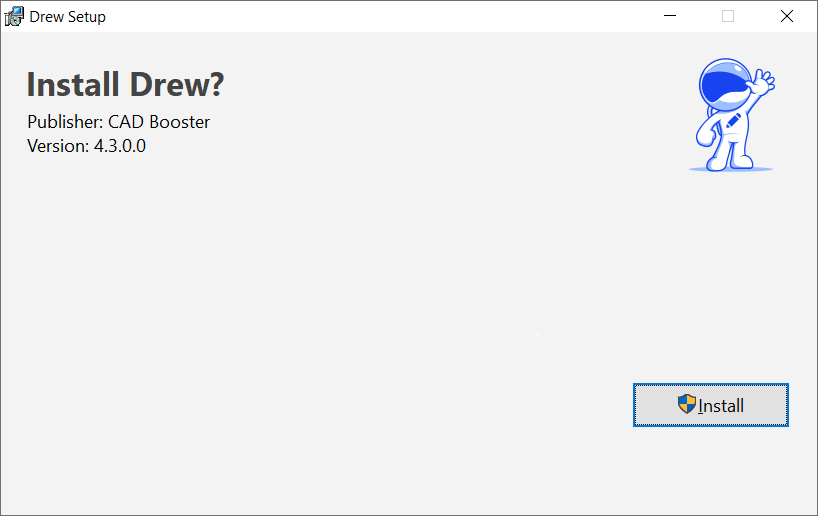
We gave our installer a fresh new look and changed it from an EXE file to an MSI. Installing Drew now takes even fewer clicks and it can be automated by your admin. There is nothing left to take away, so we are done for now! The underlying logic is still the same, so everything should still work as before.
5. More automation, more robustness
While every developer uses AI to quickly add features, we are running in the opposite direction. We are using AI to create more robustness, better protocols, more automation and more tests. Many companies now depend on our software, so we want to prevent breaking their workflow at all costs.
Every step in the build process is now documented in code and automated, so there are way fewer manual steps. We even make sure that every link still works, so we don’t send you to a Knowledge Base article that no longer exists.
6. Other improvements in this update
There are many other improvements, some visible and some not visible:
- Updated the minimum SOLIDWORKS version to 2021. We always try to support the latest five SOLIDWORKS versions and SW2020 was only used by 0.3% of our users.
- Added the option to add an annotation (block or note) to every flat pattern sheet.
- Added options to Zoom To Fit and activate the first sheet before saving.
- Added recognition of “11×17” and other similar strings as paper sizes.
- Improved AutoSave behavior during a batch.
- Changed adding a cut list so it’s not added for a part with a single body.
- Improved the look of certain buttons in the task pane on small screens.
7. Bug fixes
We were able to fix quite a few bugs this time. We want to thank every user who reported an issue. Keep ’em coming; you are making Drew a better product for everyone!
- Fixed sheet metal thickness dimension not being added.
- Fixed random missing files in Batch Tool.
- Fixed sheet name sync overwriting previous sheet names.
- Fixed errors when not confirming file path during export.
- Fixed AutoSave silently overwriting existing drawings.
- Fixed popup when adding an excluded folder to a batch.
- Fixed updating tasks when changing Batch Preset.
- Fixed exporting only flat pattern sheets.
- Fixed Lock Scale button updating.
- Fixed crashing when no default drawing template is set.
- Fixed bend notes setting.
- Fixed the Send Feedback button (ironic, we know)
8. What’s next?
For the next version, we would like to add the following:
- Add Copy with drawing.
- Remove the hard separation between (single) body sheets and multibody sheets so there is a middle ground with multiple similar bodies per sheet.
- Redesign the welcome wizard
- Add support for ARCH paper sizes
- Support multiple drawings per model
That’s quite a lot, so it may take a few updates. But we’re not out of ideas at all. The main goal is not to add buttons, every mature piece of software gets bloated with buttons, but to make the existing functionality better and smarter.
If you haven’t done so, go ahead and try out Drew for free 🙂
Probeer Drew. Boost je effectiviteit in twee minuten.
Start, bewerk en review tekeningen 100% sneller met Drew.
14 dagen proefperiode. Alle features zijn beschikbaar. Laat geen watermerk achter.